BTMOB RAT v4.6 Mobile Malware Threat Analysis
Defenders prioritizing mobile endpoint integrity must immediately audit Android Accessibility Service authorizations to counter BTMOB RAT v4.6. This technical analysis explores the malware's delivery vectors, capabilities like 2FA bypass, and step-by-step containment protocols.


Key Takeaways
- BTMOB RAT v4.6 leverages Android's Accessibility Services to programmatically approve high-level permissions and disable Google Play Protect.
- The malware implements real-time screen streaming, dynamic WebView overlays, and SMS interception to harvest credentials and bypass 2FA.
- Enterprise risk is magnified by hybrid work policies, allowing compromised mobile devices to act as initial entry points for lateral network movement.
Defenders prioritizing mobile endpoint integrity must immediately audit Android Accessibility Service authorizations within their enterprise fleet to counter a newly modernized threat. The commercialization of BTMOB RAT v4.6, a sophisticated Remote Access Trojan advertised on underground forums, introduces refined capabilities that directly target enterprise credential stores and multi-factor authentication systems. This release underscores a persistent shift in the threat landscape where advanced mobile capabilities, previously reserved for state-sponsored operations, are packaged and distributed to entry-level threat actors.
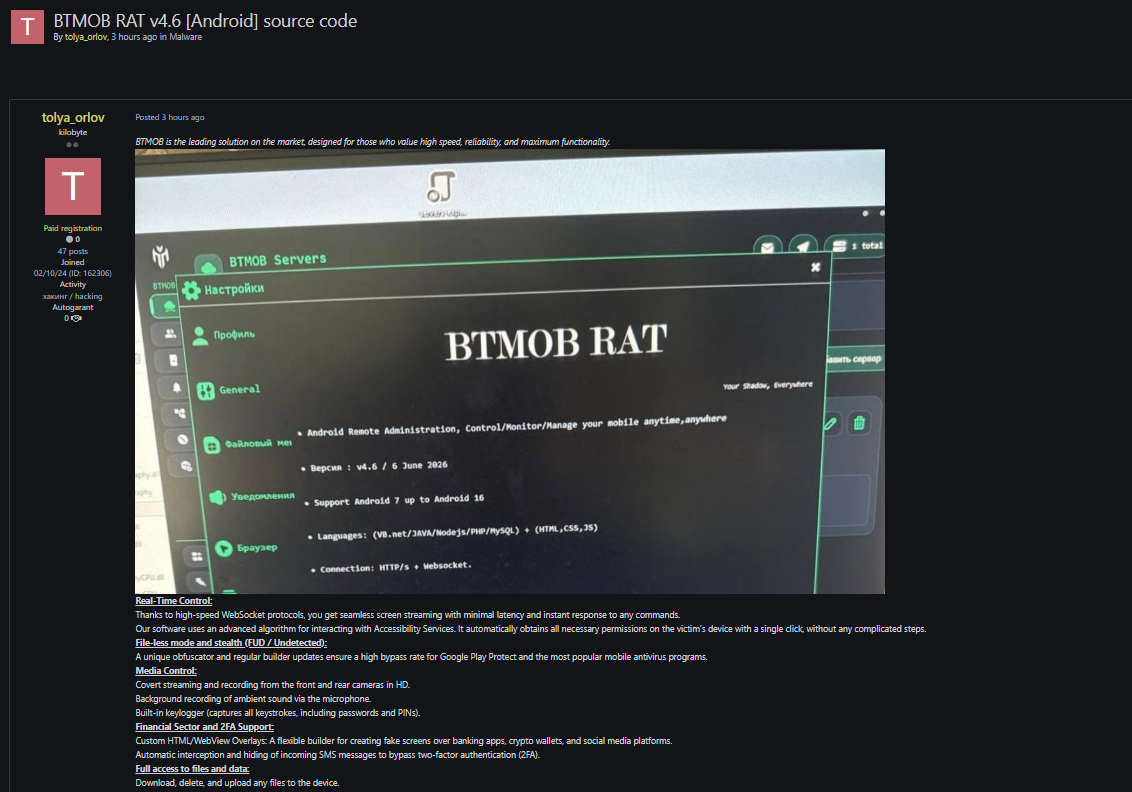
The advertisement of BTMOB RAT v4.6 signals a significant evolution in mobile malware-as-a-service. While early mobile spyware relied on simple SMS forwarders, modern threats like BTMOB are fully-fledged administrative consoles capable of live interaction. Organizations operating in the GCC, particularly within high-compliance sectors like finance and energy, must understand that these mobile implants undermine traditional endpoint boundaries. To mitigate this exposure, security teams can partner with FemtoSec to utilize specialized Dark Web Monitoring, tracking underground marketplaces for compromised corporate credentials or specific mentions of targeted infrastructure.
Threat Actor Profile: EVLF (BTMOB RAT Developer)
- Origin
- Syria
- Motivation
- Financial (Malware-as-a-Service)
- Targets
- Android DevicesCorporate SSO GatewaysFinancial & Banking AppsCryptocurrency Wallets
- TTPs
- Accessibility Services AbuseDynamic WebView OverlaysWebSocket C2 ChannelSMS Interception (2FA Bypass)
Deep Technical Analysis of BTMOB RAT v4.6
To effectively detect and neutralize BTMOB RAT, security operations centers must analyze the technical mechanics powering its operations. The malware relies on a highly structured attack chain that moves from simple manipulation to total administrative takeover.
BTMOB RAT Infection & Control Process
- 1Social Engineering
Phishing sites spoof Chrome, Starlink, Avast, or PlutoTV to deliver malicious APKs.
- 2Accessibility Request
Decoys prompt victim to enable Android Accessibility Services.
- 3Silent Escalation
Uses Accessibility APIs to simulate taps, grant permissions, and disable Play Protect.
- 4WebSocket C2 Link
Launches secure bidirectional WebSockets back to the attacker control panel.
- 5Exfiltration & Fraud
Logs keystrokes, steals SMS 2FA codes, and overlays fake WebView login portals.
1. Initial Access and Social Engineering Lures
BTMOB RAT campaigns do not typically rely on zero-day exploits to achieve execution. Instead, the malware leverages meticulously designed social engineering schemes. Threat actors deploy dedicated landing pages that mimic popular utility platforms, secure communication apps, and system updates. Common lures include forged versions of Google Chrome, Avast Antivirus, Starlink utilities, and custom communication wrappers like GB WhatsApp. In more sophisticated deployments, actors utilize multi-stage delivery systems. A primary loader, such as the MiningDropper family, installs the BTMOB package under the guise of an optimized system file. This multi-stage packaging is designed specifically to slip past static signature-based detection layers in mobile security tools.
2. Execution and Privilege Escalation via Accessibility Abuse
Once the target downloads and launches the malicious Android Package Kit (APK), the implant initiates its core compromise loop. BTMOB prompts the victim to enable Android's Accessibility Services. It generates persistent, realistic-looking dialog boxes that claim the service is required for proper runtime optimization or protection. Once a user grants the BIND_ACCESSIBILITY_SERVICE permission, the RAT ceases to rely on human interaction. It uses accessibility APIs to programmatically simulate physical touch events, silent clicks, and keyboard inputs. The malware uses this automated authority to auto-approve high-level permissions, completely disable Google Play Protect, register a background WakeLock to prevent the device from entering sleep state, and strip its icon from the launcher menu.
3. Real-Time Command and Control Communication
Older malware families relied on latent HTTP polling cycles, which introduced significant lag and made them vulnerable to behavioral detection. BTMOB RAT v4.6 utilizes persistent, real-time secure WebSocket connections to link the infected endpoint directly to the operator's web-based C2 panel. This persistent bidirectional socket allows the attacker to execute interactive commands immediately, bypass firewalls, and maintain stable remote desktop streaming even on high-latency mobile networks.
4. Critical Exploitation Capabilities and 2FA Bypass
The ultimate objective of BTMOB RAT is data monetization and financial compromise. The malware implements several highly damaging capabilities:
VNC-like Screen Streaming: Using the native Android Media Projection APIs, the attacker can view the victim's screen in real time, capturing transaction screens, multi-factor codes, and private conversations.
Automated Keylogging: The implant monitors and records every keystroke entered across the operating system, capturing master passwords, lock screen PINs, and personal notes.
SMS Interception: The RAT monitors incoming messages to hijack 2FA validation codes, allowing attackers to log in to corporate cloud services, banking sites, and email systems undetected.
Dynamic Web View Overlays: BTMOB parses the list of installed applications. When a targeted banking, crypto-wallet, or corporate application is launched, the RAT dynamically injects an aesthetic, WebView-based login overlay. The victim enters their credentials into a forged portal, which transmits the data directly to the C2 panel.
Enterprise Exposure and the Risk to Hybrid Workforces
The proliferation of BTMOB RAT v4.6 poses an acute threat to modern enterprises, particularly in regions like the GCC where hybrid work and Bring Your Own Device (BYOD) architectures are standard. Because employees frequently access corporate mail, cloud databases, and single sign-on (SSO) gateways from personal Android devices, a mobile compromise is functionally equivalent to an enterprise network breach.
If a user with administrative or privileged access is infected, the attacker can capture SSO session cookies, bypass multi-factor authentication (MFA) challenges through SMS harvesting, and initiate lateral movement. To establish a robust perimeter defense, organizations must continuously assess their external exposure and review policies. Implementing Attack Surface Management enables defenders to trace exposed endpoints, misconfigured mobile gateways, and external interfaces that threat actors exploit during lateral movement phases.
If you suspect that your domain or corporate credentials have already been compromised through mobile-related phishing campaigns, checking underground forums is essential. If the domain already looks exposed, use Dark Web Scanner before requesting a full report.
Adversary TTPs (MITRE ATT&CK Mapping)
Detection, Validation, and Containment Playbook
Defenders must establish proactive detection logic and have structured response procedures ready in the event of a suspected BTMOB RAT deployment.
Behavioral Detection Logic
Organizations should configure their mobile device management (MDM) platforms or endpoint detection and response (EDR) solutions to generate immediate alerts when any application outside the authorized enterprise store concurrently requests the following permissions:
BIND_ACCESSIBILITY_SERVICE(silently automates system touch events)SYSTEM_ALERT_WINDOW(enables malicious WebView overlays)REQUEST_IGNORE_BATTERY_OPTIMIZATIONS(prevents operating system termination of background tasks)
Additionally, network security appliances should scan outbound traffic logs for persistent WebSocket connections initiated by localized application folders, flagging long-lived connections to non-reputable external IP addresses.
Validation and Diagnostic Procedures
To validate whether an Android endpoint has been compromised by BTMOB RAT, security administrators should execute these verification steps:
Inspect Installed Accessibility Services: Navigate to Settings, Accessibility, Installed Services. Review each active application. If an unrecognized tool has active system control rights, treat the device as compromised.
Analyze Background Executables: Audit active background processes for applications running without a display name or icon. These are characteristic indicators of BTMOB's self-hiding technique.
Audit Battery and Data Usage: Inspect system resource utilization metrics. Consistent high-bandwidth consumption combined with continuous WakeLock execution indicates real-time streaming to an active C2 server.
Containment Protocols
When a compromise is identified, security teams must act quickly to isolate the asset:
Revoke Accessibility Privileges: Disable the accessibility permission for the suspicious application under Android Settings. This prevents the malware from blocking uninstallation.
Force Termination and Uninstallation: Force stop the malicious executable and delete the package.
Execute Password Rotations: Because BTMOB RAT records keystrokes and captures screen states, administrators must assume all accounts accessed from the device are compromised. Revoke active corporate SSO sessions, terminate current OAuth tokens, and mandate password changes across all corporate and personal assets.
Perform Factory Reset: For devices with confirmed lateral threat activity or extensive C2 interaction, perform a full hardware factory reset to ensure total eradication.
Enterprise Containment & Recovery Checklist
- Revoke Accessibility Service PrivilegesNavigate to Settings > Accessibility > Installed Services to disable the malicious application's control rights.
- Force Terminate and Uninstall APKForce stop the background executable and uninstall the rogue application packages.
- Revoke Active SSO Sessions & Mandate Password RotationsAssume all user credentials and SMS 2FA tokens inputted on the device are exposed. Invalidate enterprise SSO cookies immediately.
- Execute Hardware Factory ResetFor devices with deep interactive compromise, a total factory reset is required to guarantee complete remediation.
Indicators of Compromise (IoCs)
To assist security teams in scanning their environments, the following known Indicators of Compromise associated with BTMOB RAT should be integrated into endpoint and network threat search indices:
Verified Indicators of Compromise
- hash8dbfcf6b67ee6c5821564bf4228099beaf5f40e4a87118cbb1e52d8f01312f40BTMOB RAT Android Samplehash8dbfcf6b67ee6c5821564bf4228099beaf5f40e4a87118cbb1e52d8f01312f40BTMOB RAT Android Sample
- hashe0c94374706d468a00d294ca14dc9db2a0bdedbe530362632f1833fad4ae0da7BTMOB RAT Sandbox Payloadhashe0c94374706d468a00d294ca14dc9db2a0bdedbe530362632f1833fad4ae0da7BTMOB RAT Sandbox Payload
- hashc7944bdac5ce3255a56e77c6f2a83917f4b8a909646396669d408f207e751772BTMOB RAT App Filehashc7944bdac5ce3255a56e77c6f2a83917f4b8a909646396669d408f207e751772BTMOB RAT App File
- ip77.111.101.185C2 Serverip77.111.101.185C2 Server
- ip78.135.93.123C2 Serverip78.135.93.123C2 Server
- ip79.133.57.141C2 Serverip79.133.57.141C2 Server
- domainserver.yaarsa.comC2 Domaindomainserver.yaarsa.comC2 Domain
- domainbtmobrat.netSales Portaldomainbtmobrat.netSales Portal
- domainthebtmob.comSales Portaldomainthebtmob.comSales Portal
File Hashes (SHA-256)
8dbfcf6b67ee6c5821564bf4228099beaf5f40e4a87118cbb1e52d8f01312f40e0c94374706d468a00d294ca14dc9db2a0bdedbe530362632f1833fad4ae0da7c7944bdac5ce3255a56e77c6f2a83917f4b8a909646396669d408f207e751772
Network Infrastructure (C2 IPs)
77.111.101.18578.135.93.12379.133.57.141
Distribution & C2 Domains
server.yaarsa.combtmobrat.netthebtmob.com
By incorporating these detection rules, maintaining rigorous application distribution boundaries, and ensuring personnel undergo continuous security training, enterprises can insulate themselves against the threat of commercialized mobile remote access tools.
How to Defend Against Similar Threats
- Audit MDM configurations to restrict applications from concurrently requesting accessibility and overlay permissions.
- Instruct users to immediately revoke accessibility permissions and execute password resets if anomalous device activity is detected.
- Integrate provided network indicators and SHA-256 file hashes into endpoint detection scanners.
Threat Intel FAQ
How does BTMOB RAT v4.6 bypass two-factor authentication?
Can BTMOB RAT disable system protections on Android?
Could a similar threat affect your organization?
If your team may be exposed to a similar threat, FemtoSec can help validate blast radius, prioritize remediation, and connect the issue to a practical security program.
Related Threats

August 6, 2026
Anonymous Mobile RAT v6 Analysis
Underground threat actors have announced the release of Anonymous Mobile RAT v6, an advanced Android Remote Access Trojan designed to capture credentials, record screens, and abuse accessibility settings, creating severe risks for enterprise mobile security.
October 7, 2026
AbkoRAT License Sale Fuels Remote Surveillance Threat
Underground forums have observed threat actors commercializing AbkoRAT, a commercial Remote Access Trojan engineered for stealthy surveillance, multimedia interception, credential harvesting, and arbitrary command execution across compromised enterprise hosts.

September 18, 2026
Hermes Stealer Emerges with HVNC and Token Theft
A new malware-as-a-service offering named Hermes has surfaced on underground forums, bundling hidden virtual desktop control, browser credential harvesting, crypto wallet theft, and remote command execution.